12 Free AI Design Tools Checked: Only 6 Are Truly Free
Of the 12 AI design tools on IMDA's list for Singapore SMEs, six can be used free with no clock running: Canva, Figma, Adobe Firefly, Leonardo.Ai, Descript and GIMP. The best pick per job: Canva Free for social posts and menus, Figma Starter for website and app screens, Firefly for prompt images, GIMP or Photoshop mobile for product photos, and Descript for video.
The other six (Jasper, Simplified, Sketch, Adobe Illustrator, Adobe Photoshop on desktop and Midjourney) are trials, or in Midjourney's case barely that. IMDA added all 12 to a new AI Tools page on the SMEs Go Digital portal on 13 October 2026, part of 116 curated global tools that each come with a free tier or free trial. Below, each tool gets its own verdict, based on what its vendor's pricing or help page offered free in October 2026. For the programme as a whole, see our IMDA free AI tools guide.
The ground rules for this review
IMDA chose the tools, not us. Its note says the list was curated from multiple sources, considering signals of market adoption with generally positive user sentiment and relevance to local SME needs. These are not grant-supported pre-approved solutions, and Biks is not on the list.
We read each vendor's own pricing or help page in October 2026 and recorded the free terms as written, leaving out paid prices because they change often and vary by currency. One distinction matters throughout: a free plan lasts as long as you stay inside its limits, while a free trial opens paid features for a set number of days, sometimes with billing details taken up front. For design tools, also look past the headline for watermarks, whether your creations are public, and whether commercial use is allowed.
Canva: the default starting point for everyday graphics
Canva is templates plus a drag-and-drop editor for social posts, menus, posters, presentations and short videos, with AI tools that generate a brand-consistent design from a single prompt and resize it for each channel. It is built for the café updating its menu board and Instagram posts, or the clinic making patient notices, with no designer on staff.
Canva Free is available to anyone, for one person, with millions of stock items and templates. Canva Pro and Canva Business both offer a free trial on top. The catch is where the good parts live: premium content, more powerful design tools and fuller AI features sit in paid plans, so a growing team usually upgrades.
Verdict: start here for anything that ends up on social media or a printed notice.
Figma: free for screens, stingy with AI credits
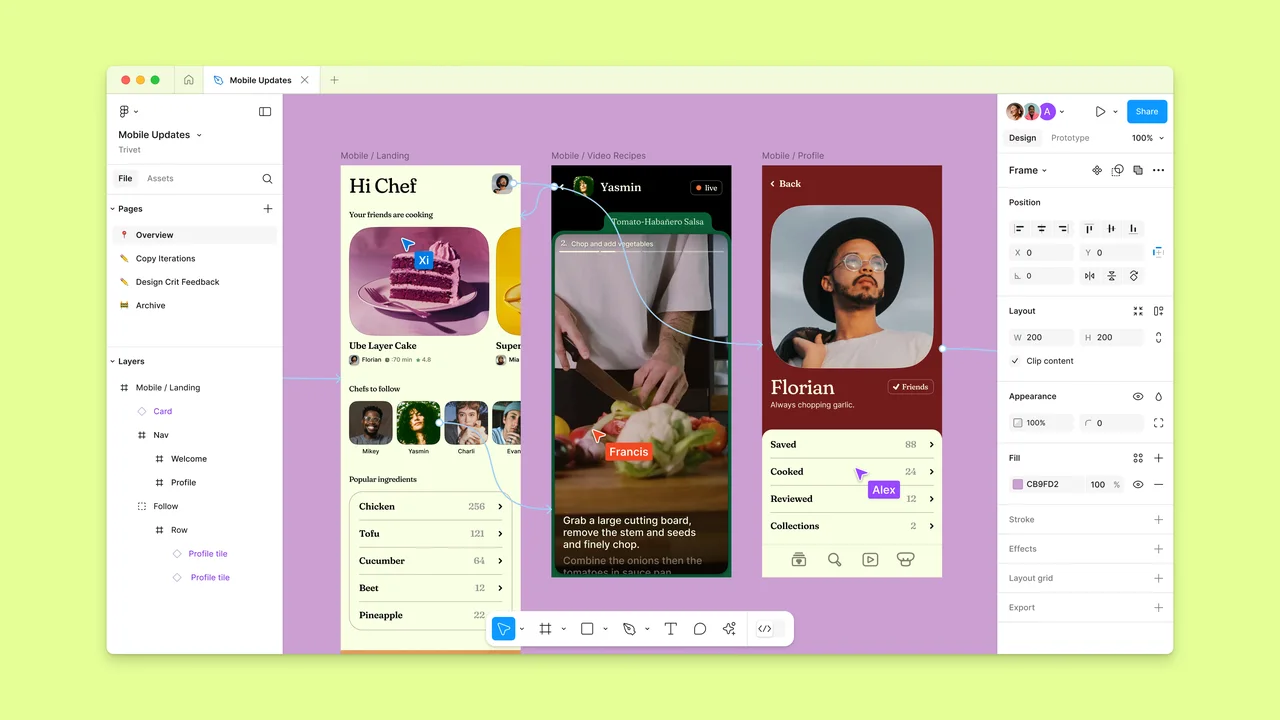
Figma is the standard for website and app design, with AI tools that now run across design, slides and sites. The Starter plan is free, with unlimited drafts, UI kits and templates, and 150 AI credits a day up to 500 a month.
That is plenty for an SME briefing a developer on a new booking page. It is not much for anyone leaning on the AI features every day, because the monthly cap arrives quickly.
Verdict: the right free tool for mock-ups; treat the AI as a bonus, not the reason to sign up.
Adobe Firefly: daily free images without a plan
Adobe says you don't need a plan to get free daily generations across image, video and audio, and the limits refresh every day. That makes Firefly the easiest way on this list to produce quick campaign images, especially if your designer already works in Adobe. Heavier use needs a plan.
Verdict: the best free prompt-to-image tool for a business that wants to stay in one ecosystem.
Leonardo.Ai: a generous free plan, with your work on show
Leonardo.Ai bundles many models and presets in one place, which suits product shots and ad visuals. Its free plan gives 150 fast tokens a day with access to public presets.
Where it breaks: creations on the free plan are public, and private generations come with paid plans. Fine for testing a look; not for an unreleased product.
Verdict: good for experiments, wrong for anything confidential.
Descript: video editing that works like a document
Descript edits audio and video by editing the transcript, with Studio Sound to clean up recordings. The Free plan needs no credit card, exports at 720p and includes 100 AI credits, a limited allowance for AI features. It suits a professional-services firm turning a webinar into short clips. For more options, see our AI video tools guide.
Verdict: the only video tool in this category, and free enough to find out whether you need it.
GIMP: no AI, no bill, no trial clock
GIMP is a free and open-source image editor that runs on Windows, Mac and Linux, extensible with plug-ins. There is no subscription and nothing expires. The price of that freedom is time: it takes longer to learn, and it has no built-in generative AI, which makes it an odd entry on an AI list.
Verdict: the free Photoshop substitute for someone patient.
Adobe Photoshop: the trial ends, the phone app stays free
Photoshop brings generative fill and object removal to photo editing and retouching. There is a 7-day free trial of the desktop app, which converts to paid unless cancelled. Adobe also says Photoshop mobile is free on iPhone and Android, which is the part a small online shop retouching product photos may never need to leave.
Verdict: use the free mobile app day to day; save the desktop trial for a heavy retouching job.
Adobe Illustrator: seven days for print-ready vectors
Illustrator is the tool for logos and vector artwork, now with text-to-vector generation, and the one to use when a designer needs files a printer will accept. Adobe offers a 7-day free trial, one per person, with billing details at signup; it converts to a paid membership unless you cancel.
Verdict: worth the trial only if the job is ready to start that week.
Sketch: a month free, but only on a Mac
Sketch is a native Mac design app with real-time collaboration and a web app for sharing. It offers 30 days free with no credit card, and states plainly that it has no free plan.
Verdict: try it if your team is all on Mac; otherwise Figma Starter does the same job for free.
Jasper: a week to test brand voice
Jasper is an AI content platform for marketing teams that care about keeping brand voice consistent across campaigns. It is closer to a copy tool than a design tool, and it offers a 7-day free trial of the Pro plan with no lasting free plan. If you mostly need words, a general assistant may be enough; see our AI assistants guide.
Verdict: for an agency or marketing team producing a lot of copy, not for occasional posts.
Simplified: a full trial with no stated end date
Simplified combines design, copy and social scheduling, with AI that drafts campaigns for you to approve. Its pricing page says the trial includes full Starter access: 5 campaigns, 100K AI words and 100 AI designs. The trial length is not stated there, so plan your test before you sign up. If the visuals feed email campaigns, compare it with the tools in our marketing and email tools guide.
Verdict: a fair test for a small team running social campaigns, as long as you know when it stops.
Midjourney: is there any free way in?
Barely. Midjourney is known for striking images and fine style control, but its help centre says there is currently no free trial in Discord or on midjourney.com, only a limited trial in the niji·journey mobile app.
Two lines on its plan page matter more to a business. Companies with more than US$1,000,000 in gross yearly revenue must use the Pro or Mega plan, and Stealth Mode, which keeps images private, is only on those plans.
Verdict: a paid tool for concept work; it does not belong on a free shortlist.
The scorecard
Each tool's free terms as stated by the vendor in October 2026.
| Tool | Free option | Verdict |
|---|---|---|
| Canva | Free plan for one person | Start here for social and print |
| Figma | Starter plan; 500 AI credits a month | Best for screens |
| Adobe Firefly | Free daily generations | Best free prompt images |
| Leonardo.Ai | 150 fast tokens a day | Free work is public |
| Descript | Free plan; 720p, 100 AI credits | Best for video clips |
| GIMP | Free and open source | No AI, no bill |
| Adobe Photoshop | 7-day trial; mobile app free | Use the mobile app |
| Adobe Illustrator | 7-day trial | Only for a ready job |
| Sketch | 30-day trial | Mac teams only |
| Jasper | 7-day trial | For heavy copy work |
| Simplified | Starter trial, length not stated | Test with a plan |
| Midjourney | Limited trial in niji·journey app | Not a free tool |
What none of these tools will do
Every tool above is good at the last mile: layout, images and polish. That is rarely where the hours go. Before anyone opens Canva, someone has to pull numbers from a spreadsheet, dig points out of meeting notes and WhatsApp threads, and decide what the deck or brief should say. A renovation contractor's client update, an accounting firm's quarterly summary or a logistics SME's performance review all start there. Free tools also do not connect to your other systems, apply your approval rules, keep your files and figures in one place, or check that the monthly report actually got made.
That step before is what Rapi™, the executive assistant Biks runs in WhatsApp, handles. You send meeting notes, a voice note or a spreadsheet, and Rapi™ turns them into a structured brief, a deck outline or a summary with the figures pulled out, ready to paste into Canva, Figma or Adobe once you approve it. For visuals, those tools remain the right choice. Compare Rapi™ with general assistants in Rapi™ vs ChatGPT.
The same approach runs through Biks' operations work: one multi-outlet F&B brand reconciles 13 outlets against the bank every day under its own rules, and its team has 2 hours a day back. Workflows go live in weeks. If gathering content is your bottleneck, book a call, or return to the full IMDA free AI tools list to explore other categories.
Sources
- IMDA: Artificial Intelligence Tools | SMEs Go Digital
- IMDA: 30 SMEs Recognised at Inaugural SME AI Impact Awards as IMDA Expands Digital Support for SMEs
- Canva: Canva Pricing: Compare Free, Pro, Business and Enterprise plans
- Figma: Plans & Pricing | Figma
- Adobe: Adobe Firefly plans
- Leonardo.Ai: Leonardo.Ai Pricing: Individual, Team & API Plans
- Descript: Descript Pricing | Plans for Every Creator, Free to Start
- Midjourney: Free Trials – Midjourney
- Midjourney: Comparing Midjourney Plans – Midjourney
- Adobe: Photoshop Free Trial & Free Download | Official Adobe Photoshop
- Adobe: Free Photoshop app: Free photo editor app
- Adobe: Illustrator Free Download & Free Trial | Adobe Illustrator
- Sketch: Pricing for individuals, agencies & teams · Sketch
- Jasper: Plans & Pricing | Jasper
- Simplified: Simplified Pricing: Plans for Your AI Agent Team
Common questions
- What free AI design tools does IMDA list for SMEs?
- IMDA's AI Tools page on the SMEs Go Digital portal lists 12 design and image tools: Canva, Jasper, Simplified, Figma, Sketch, Adobe Illustrator, Adobe Photoshop, Adobe Firefly, GIMP, Midjourney, Leonardo.Ai and Descript. Each has a free tier or free trial. They are curated global tools, not grant-supported pre-approved solutions.
- Is Canva free for businesses in Singapore?
- Yes. As of October 2026, Canva Free is available to anyone for one person and includes millions of templates and stock items. Businesses that need premium content, more powerful design tools, fuller AI features or team features can start a free trial of Canva Pro or Canva Business before paying. Check Canva's pricing page for current limits.
- Is there a free trial for Midjourney?
- Not on the website. As of October 2026, Midjourney's help centre says no free trial is available on Discord or midjourney.com, and a limited trial is offered only in the niji·journey mobile app. Companies earning more than US$1 million in gross yearly revenue must use the Pro or Mega plan.
- Can I use free AI-generated images commercially?
- It depends on the tool and plan. Some free plans make your creations public, add watermarks or limit commercial use, while paid plans add private generation and broader rights. Leonardo.Ai, for example, makes free-plan creations public. Read each vendor's terms before using an AI image in ads, packaging or your website, and avoid generating real people's likenesses or other brands' logos.
- What is the best free alternative to Photoshop?
- GIMP is a free, open-source image editor for Windows, Mac and Linux with no subscription, though it has no built-in generative AI. Adobe also says Photoshop mobile is free on iPhone and Android, and Adobe Firefly offers free daily generations. For quick social graphics rather than photo retouching, Canva Free is often the simpler choice.